你可能见过这个动画, 一个在命令行界面中翻滚的甜甜圈, 就像下面这样:
这个程序的源码长这样, 也是一个甜甜圈🍩 (如果你不介意那些填充的注释的话)
             k;double sin()
         ,cos();main(){float A=
       0,B=0,i,j,z[1760];char b[
     1760];printf("\x1b[2J");for(;;
  ){memset(b,32,1760);memset(z,0,7040)
  ;for(j=0;6.28>j;j+=0.07)for(i=0;6.28
 >i;i+=0.02){float c=sin(i),d=cos(j),e=
 sin(A),f=sin(j),g=cos(A),h=d+2,D=1/(c*
 h*e+f*g+5),l=cos      (i),m=cos(B),n=s\
in(B),t=c*h*g-f*        e;int x=40+30*D*
(l*h*m-t*n),y=            12+15*D*(l*h*n
+t*m),o=x+80*y,          N=8*((f*e-c*d*g
 )*m-c*d*e-f*g-l        *d*n);if(22>y&&
 y>0&&x>0&&80>x&&D>z[o]){z[o]=D;;;b[o]=
 ".,-~:;=!*#$@"[N>0?N:0];}}/*#****!!-*/
  printf("\x1b[H");for(k=0;1761>k;k++)
   putchar(k%80?b[k]:10);A+=0.04;B+=
     0.02;}}/*****####*******!!=;:~
       ~::==!!!**********!!!==::-
         .,~~;;;========;;;:~-.
             ..,--------,*/
你可能猜到了这是 IOCCC 的参赛作品, 它的作者特地写了一篇博客来介绍它的工作原理.
绘制甜甜圈
想象一下 3D 世界的甜甜圈, 甜甜圈是一个圆形绕一个轴旋转而得到的旋转体, 不妨取这个旋转体的一个截面出来看看, 下图是这个旋转体在 平面的截面, 即当 :
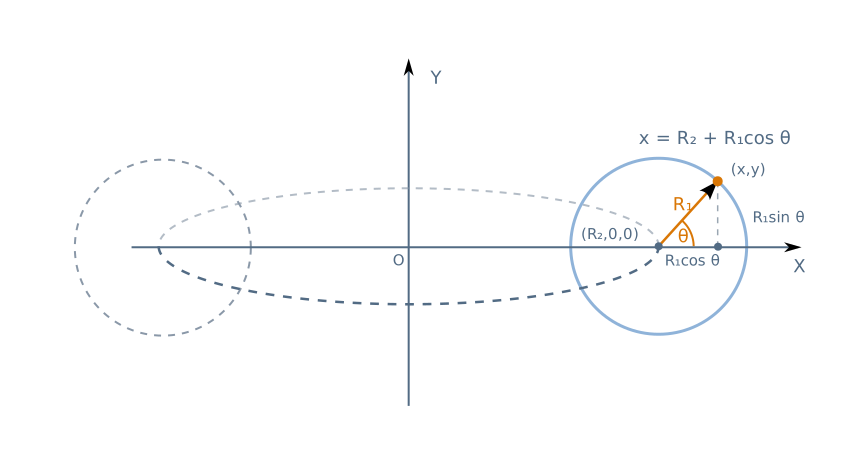
如上图所示, 这个旋转体由一个半径为 圆心 绕 轴旋转得来, 假设小圆上任意一点 与小圆圆心的夹角为 那么这个点的坐标可以表示为:
即
接下来让这个圆绕 轴旋转变成我们的甜甜圈, 假设绕 轴旋转的角度是 , 只需要将上面的结果乘以旋转矩阵即可得到旋转后的坐标, 也就是:
这样一来我们就有了 3D 甜甜圈上任意一点 的坐标表示了, 但是请注意, 此时的甜甜圈是完全静止的, 为了实现甜甜圈不断翻滚的效果, 我们还需要分别对这个坐标做 轴和 轴的旋转变换, 也就是:
这样一来我们就能得到分别绕 和 轴旋转 和 的甜甜圈表面上任意一点 的表示.
想一想为什么这里只对甜甜圈做 和 轴的旋转?
因为这个甜甜圈本身就是绕 轴旋转得来的旋转体, 它本身就是 轴对称的, 再让这个旋转体绕 轴旋转不会有视觉上的任何变化!
投影变换
为了将这个 3D 的甜甜圈显示在 2D 的屏幕上, 我们可以想象这个甜甜圈此刻就在屏幕后方, 甜甜圈上每一个点 发出的光都穿过屏幕上的点 到达我们的眼睛, 我们的目的是获取甜甜圈在屏幕上的投影.
根据三角形的相似关系我们可以得到 和 .
如果我们固定 , 可以得到
但是这里有一个问题, 这里的的 是相对于甜甜圈旋转中心的坐标, 而非我们眼睛到这个点的 轴距离, 假设甜甜圈中心到原点的距离为 , 如下图所示:
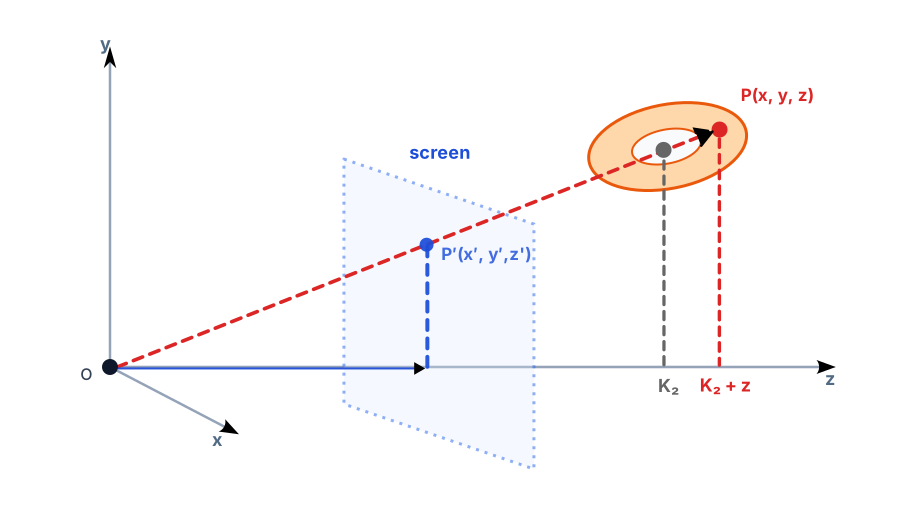
所以之前的投影坐标应该修正成:
这里的 和 控制着屏幕和甜甜圈到人眼的深度距离, 改变它们的值就能调整甜甜圈投影的大小和畸变程度.
现在我们就能够在屏幕上绘制这个旋转甜甜圈的投影了, 但是还有两个问题需要改进.
第一点是我们在绘制甜甜圈投影时重复绘制了一些不必要的像素, 我们的视线可能会先后过甜甜圈的内外两层甚至更多层的像素点, 而这些点在屏幕上的投影位置都相同, 这就意味着后绘制的像素会覆盖掉之前的像素, 当实际上我们只需要绘制离我们最近的像素点就行了, 这样更符合视觉表现, 尤其是我们接下来还要处理光照问题. 具体做法就是绘制投影点前先判断这个点对应的 值, 更小的 值意味着离我们更近, 其优先级就越高, 而我们的投影只需要绘制这些高优先级的像素点就行了.
第二点是光照问题, 没有光照的投影渲染看起来并不像真正的甜甜圈, 因为无从分辨其凹凸的形状. 光照问题可以很复杂, 但这里作者使用了一种很简单的方法, 即计算甜甜圈上每个点的法向量, 再使用这个法向量和光照向量作点积, 根据点积的值使用不同的字符来模拟不同的光照强度.
法线向量 推导方式和坐标推导方式几乎相同,只需将坐标表达式的初始坐标替换成方向向量 即可:
接下来我们需要选定一个光照方向, 比如 就意味着光从屏幕的前下方照上来(为了方便计算这里并没有使用归一化的单位向量来表示光照), 这样我们就能获得一个简洁的亮度 .
下面是原作者给出的一个可读版的实现, 这里选择了 和 以及 .
const float theta_spacing = 0.07;
const float phi_spacing   = 0.02;

const float R1 = 1;
const float R2 = 2;
const float K2 = 5;
// Calculate K1 based on screen size: the maximum x-distance occurs
// roughly at the edge of the torus, which is at x=R1+R2, z=0.  we
// want that to be displaced 3/8ths of the width of the screen, which
// is 3/4th of the way from the center to the side of the screen.
// screen_width*3/8 = K1*(R1+R2)/(K2+0)
// screen_width*K2*3/(8*(R1+R2)) = K1
const float K1 = screen_width*K2*3/(8*(R1+R2));

render_frame(float A, float B) {
  // precompute sines and cosines of A and B
  float cosA = cos(A), sinA = sin(A);
  float cosB = cos(B), sinB = sin(B);

  char output[0..screen_width, 0..screen_height] = ' ';
  float zbuffer[0..screen_width, 0..screen_height] = 0;

  // theta goes around the cross-sectional circle of a torus
  for (float theta=0; theta < 2*pi; theta += theta_spacing) {
    // precompute sines and cosines of theta
    float costheta = cos(theta), sintheta = sin(theta);

    // phi goes around the center of revolution of a torus
    for(float phi=0; phi < 2*pi; phi += phi_spacing) {
      // precompute sines and cosines of phi
      float cosphi = cos(phi), sinphi = sin(phi);

      // the x,y coordinate of the circle, before revolving (factored
      // out of the above equations)
      float circlex = R2 + R1*costheta;
      float circley = R1*sintheta;

      // final 3D (x,y,z) coordinate after rotations, directly from
      // our math above
      float x = circlex*(cosB*cosphi + sinA*sinB*sinphi)
        - circley*cosA*sinB;
      float y = circlex*(sinB*cosphi - sinA*cosB*sinphi)
        + circley*cosA*cosB;
      float z = K2 + cosA*circlex*sinphi + circley*sinA;
      float ooz = 1/z;  // "one over z"

      // x and y projection.  note that y is negated here, because y
      // goes up in 3D space but down on 2D displays.
      int xp = (int) (screen_width/2 + K1*ooz*x);
      int yp = (int) (screen_height/2 - K1*ooz*y);

      // calculate luminance.  ugly, but correct.
      float L = cosphi*costheta*sinB - cosA*costheta*sinphi -
        sinA*sintheta + cosB*(cosA*sintheta - costheta*sinA*sinphi);
      // L ranges from -sqrt(2) to +sqrt(2).  If it's < 0, the surface
      // is pointing away from us, so we won't bother trying to plot it.
      if (L > 0) {
        // test against the z-buffer.  larger 1/z means the pixel is
        // closer to the viewer than what's already plotted.
        if(ooz > zbuffer[xp,yp]) {
          zbuffer[xp, yp] = ooz;
          int luminance_index = L*8;
          // luminance_index is now in the range 0..11 (8*sqrt(2) = 11.3)
          // now we lookup the character corresponding to the
          // luminance and plot it in our output:
          output[xp, yp] = ".,-~:;=!*#$@"[luminance_index];
        }
      }
    }
  }

  // now, dump output[] to the screen.
  // bring cursor to "home" location, in just about any currently-used
  // terminal emulation mode
  printf("\x1b[H");
  for (int j = 0; j < screen_height; j++) {
    for (int i = 0; i < screen_width; i++) {
      putchar(output[i,j]);
    }
    putchar('\n');
  }

}